15 more games added; many more still waiting.
http://thoughtfulmonkey.com/slgameslist/
Sunday, 16 August 2009

Sunday, 9 August 2009
Crime Scene - Fingerprints
This morning's addition to the forensics simulator was a Comparison Microscope, specifically for the purpose of identifying finger prints (although I'm not sure it's actually used for this purpose).
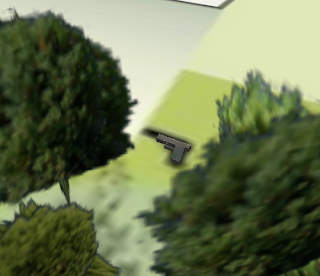
It is now possible to assign fingerprints to objects in the world, which can be retrieved while wielding the correct tool. Below we have the murder weapon hidden in some bushes. A print taken from this can be compared with one taken from the hand-prints in the bathroom.
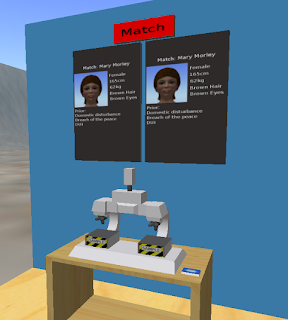
Shown below is the comparison microscope itself. Fingerprint samples can be dropped onto the left or right location. If the print is on file then the corresponding record appears on the panel behind; and a match between two samples is also flagged.
It is now possible to assign fingerprints to objects in the world, which can be retrieved while wielding the correct tool. Below we have the murder weapon hidden in some bushes. A print taken from this can be compared with one taken from the hand-prints in the bathroom.

Shown below is the comparison microscope itself. Fingerprint samples can be dropped onto the left or right location. If the print is on file then the corresponding record appears on the panel behind; and a match between two samples is also flagged.

Saturday, 8 August 2009
Crime Scene - Blood Samples
The Ideal System for Evidence
I strongly believe that in training situations, virtual environments should only be used to 'fill in the gaps' for things that can't be done in the real-world. For example in this case, it's unlikely that a department would be able to provide a restaurant and alleyway for students to investigate; and impossible to have 20 such environments, so that all students can perform the exercise at the same time. This is what the virtual environment provides.
However, in using the environment I would argue for a system similar to a murder mystery event that I recently attended:
I think that this system has a good clear division between gathering (virtual) and analysing (real); which would obviously need to be supported with real-world evidence gathering exercises - but these could be on a smaller scale focusing on skills rather than the environment.
Without wanting to waffle too much, it could be taken to the extreme, where students are given physical props when they encounter the virtual counterpart. Act-UK have a system in this style, developed by make-media; where a cave-style technology provides the environment and real-life actors and props form the foreground.
Virtual Blood Sampling
However, using the above method wouldn't leave me with much to do, and so I've created a virtual blood sampling system as an alternative. As with the UV light, the student must equip the swab to the avatar, and can then click on the object to sample (in the image below it is the victims blood).
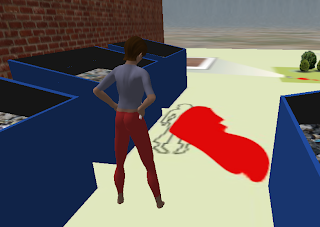
The student is then given a sample, which is stored in their inventory. These can be given unique id's for use in the afore-mentioned method, or the student can be tasked with assigning them names and recording where they were taken.
These samples can then be dropped onto the centrifuge; where various characteristics are reported back.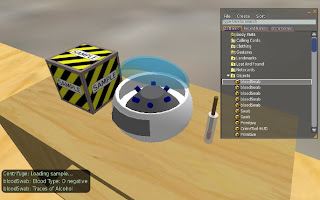
I strongly believe that in training situations, virtual environments should only be used to 'fill in the gaps' for things that can't be done in the real-world. For example in this case, it's unlikely that a department would be able to provide a restaurant and alleyway for students to investigate; and impossible to have 20 such environments, so that all students can perform the exercise at the same time. This is what the virtual environment provides.
However, in using the environment I would argue for a system similar to a murder mystery event that I recently attended:
- Students explore the environment gathering virtual evidence.
- At the end of the exercise a list of reference codes is given for the virtual evidence.
- Tutors give students real evidence based on these references.
I think that this system has a good clear division between gathering (virtual) and analysing (real); which would obviously need to be supported with real-world evidence gathering exercises - but these could be on a smaller scale focusing on skills rather than the environment.
Without wanting to waffle too much, it could be taken to the extreme, where students are given physical props when they encounter the virtual counterpart. Act-UK have a system in this style, developed by make-media; where a cave-style technology provides the environment and real-life actors and props form the foreground.
Virtual Blood Sampling
However, using the above method wouldn't leave me with much to do, and so I've created a virtual blood sampling system as an alternative. As with the UV light, the student must equip the swab to the avatar, and can then click on the object to sample (in the image below it is the victims blood).

The student is then given a sample, which is stored in their inventory. These can be given unique id's for use in the afore-mentioned method, or the student can be tasked with assigning them names and recording where they were taken.
These samples can then be dropped onto the centrifuge; where various characteristics are reported back.

Friday, 7 August 2009
Crime Scene - Visual Tools
Camera
To be honest my experience of forensics is based solely on documentaries and CSI, but something that seems important is taking lots of photographs. SL Viewers offer a free-roaming camera that you can position how you want, and a 'snapshot' feature to save screen-shots. So that's one tool ticked off.
UV Light
Another common tool seems to be the UV light, for highlighting various bodily fluids. A representation of this is fairly straight forward in SL; you simply control the switching of textures and emissive colour (see the images below of the suspected escape route - a bathroom window).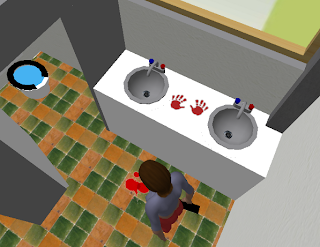
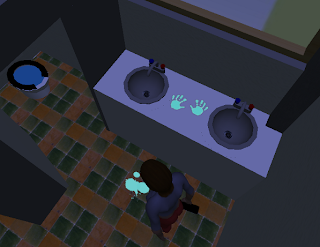 Note that it was the ladies bathroom, which already gives us a clue as to the muderer.
A major issue encountered is that OpenSim doesn't seem to allow objects in-world to hear messages from HUDs. In the example above the avatar is carrying a UV light, which you click on to toggle the light on/off. This method may be more realistic in that different tools must be worn in order to be used, but from a usability perspective a HUD is often the best choice. We'll see how this affects other tools.
To be honest my experience of forensics is based solely on documentaries and CSI, but something that seems important is taking lots of photographs. SL Viewers offer a free-roaming camera that you can position how you want, and a 'snapshot' feature to save screen-shots. So that's one tool ticked off.
UV Light
Another common tool seems to be the UV light, for highlighting various bodily fluids. A representation of this is fairly straight forward in SL; you simply control the switching of textures and emissive colour (see the images below of the suspected escape route - a bathroom window).

 Note that it was the ladies bathroom, which already gives us a clue as to the muderer.
A major issue encountered is that OpenSim doesn't seem to allow objects in-world to hear messages from HUDs. In the example above the avatar is carrying a UV light, which you click on to toggle the light on/off. This method may be more realistic in that different tools must be worn in order to be used, but from a usability perspective a HUD is often the best choice. We'll see how this affects other tools.
Thursday, 6 August 2009
Virtual Crime Scene
There has been some discussion at work about using SL as a tool for a forensics course; and having some free time I thought I'd look into it. The biggest initial surprise when working with the latest edition of OpenSim (with the Meerkat viewer) is that the maximum size limit for prims has been increased; which makes things considerably easier.
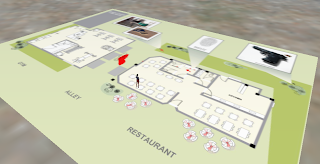 The first benefit is being able to lay out a whole floor plan in one piece (apparently produced in some software called SmartDraw).
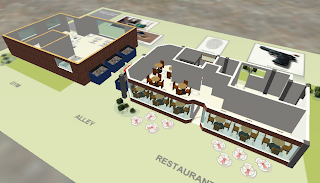 The creation of buildings is also a lot simpler, since you're no longer restricted to 10m panels.
The scene is at the moment fairly basic, but will allow me to start investigating potential tools and issues. The first concern is the camera angle. In the field of computer games, if a third-person view is used then camera positioning is massively important, and a lot of effort is put into getting it right - with various algorithms used to reposition it so that the view of the main character is never obscured. In tightly enclosed environments a first person view is often chosen instead. In contrast SL's 3rd person camera is fixed behind the avatar, which in enclosed spaces means that the view is often obscured by walls. A 1st person view is included, but removes the possibility of interacting with a HUD. The enclosed architectural spaces appropriate for a forensic simulation may cause some design problems.
Next step is to look at some tools (see below for a sneak preview):
 The first benefit is being able to lay out a whole floor plan in one piece (apparently produced in some software called SmartDraw).
 The creation of buildings is also a lot simpler, since you're no longer restricted to 10m panels.
The scene is at the moment fairly basic, but will allow me to start investigating potential tools and issues. The first concern is the camera angle. In the field of computer games, if a third-person view is used then camera positioning is massively important, and a lot of effort is put into getting it right - with various algorithms used to reposition it so that the view of the main character is never obscured. In tightly enclosed environments a first person view is often chosen instead. In contrast SL's 3rd person camera is fixed behind the avatar, which in enclosed spaces means that the view is often obscured by walls. A 1st person view is included, but removes the possibility of interacting with a HUD. The enclosed architectural spaces appropriate for a forensic simulation may cause some design problems.
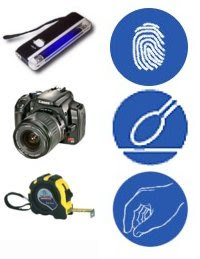
Next step is to look at some tools (see below for a sneak preview):

Monday, 22 June 2009
Toy Interface
I added the video to YouTube, but forget to comment on it here. Basically it's very easy to make all sorts of interesting user input devices if you can get hold of a keyboard encoder. A keyboard is in essence a lot of buttons connected to some electronics that communicates to the computer. A keyboard encoder is just a stripped down keyboard, which allows you to add your own buttons.
In the example below I took a childrens toy and wired it up to control the avatar in second life. For example the accelerator pedal is wired up so that when you press it, the encoder tells the computer that the up arrow key was pressed. Very easy.
As a rule of thumb, if the toy makes a noise when you press/turn/squeeze/shake/whatever, then you can use that as an input. Just find the two wires that go to that part, and connect them to your keyboard encoder instead.
In the example below I took a childrens toy and wired it up to control the avatar in second life. For example the accelerator pedal is wired up so that when you press it, the encoder tells the computer that the up arrow key was pressed. Very easy.
As a rule of thumb, if the toy makes a noise when you press/turn/squeeze/shake/whatever, then you can use that as an input. Just find the two wires that go to that part, and connect them to your keyboard encoder instead.
Friday, 19 June 2009
Using the Meerkat viewer

Shown above is the Cannons and Castles game, ported from SL to a local OpenSim grid using the new Meerkat viewer (discussed in several places). It's fairly fast and pain free, but doesn't carry over scripts - and may never be able to.
It looks like a great option for people to backup work, create locally and then upload to SL, or to flee the sinking ship (2 years of sinking and still no change in the water line).
Interestingly the data is saved to an xml format, which is likely to lead to an explosion in tools for procedurally generating content, file conversion and import/export plugins. It looks to be a much more elegant solution than current systems.
Subscribe to:
Posts (Atom)

