Thursday, 30 December 2010

Half Day Challenge: Movement


A few overheads in setting up, but I now have a HUD that controls orientation and movement. I'm using the llDetectedUV function for both.

For the rotation this touch coordinate needs to be converted to an angle, which you can do using the llAtan2 function - just remember to subtract 0.5 from both x and y to move the origin to the centre.

vector touchPoint = llDetectedTouchUV(0);
float angle = llAtan2(touchPoint.y - 0.5, touchPoint.x - 0.5);

The angle will need adjusting so that clockwise is positive 0-180, and anticlockwise is negative. The OpenSim version that I'm using (0.7.02) returns inconsistent results for the four 90 degree quarters, so it might take some trial and error depending on what system you're using.

For movement, I'm just passing on the x component. Since this is just a number between 0 and 1 I'll use it to scale the movement. While on the subject, moving objects "forwards" is very easy using the built-in functions:

// Get the current rotation
rotation myRot = llGetRot();

// Get the vector that is pointing "forwards"
vector fwd = llRot2Fwd(myRot);

// Get the current position
vector myPos = llGetPos();

// Move forward a distance based on variables maxSpeed and movementScale
myPos = myPos + (fwd * maxSpeed * movementScale);


Just remember that an objects forward direction is along its positive x axis.

Time for lunch.

Half Day Game Development Challenge

I've found some free time over the Christmas break, so I thought that I'd devote half a day to working on a game project - it is the title of this blog after-all.

SL-based platforms aren't a good choice for real-time games. Basically, unless you're running a dedicated sim in SL with very little on it, then lag is going to be a major problem. As much as I love OpenSim, its performance would be even worse.

I've always thought that SL is a better platform for turn-based games. If you think about real-life, apart from sports, most games are turn-based, from hopscotch, to Monopoly, to Warhammer, to poker, to spin-the-bottle. Although this is hardly an epiphany, since most of the games that I've come across in SL were turn-based.

Anyway, since New World Notes reported that SL's new CEO had worked on some Open Source miniature wargame rules, that seemed like a perfect fit. I'll update on progress.

Monday, 13 December 2010

Results of OpenSim/SL Exercise

Last week we ran the SL/OpenSim activity for directing actors. The overall aim was for students to work in groups to plan out the stage direction for a piece of dialogue from Hamlet that only involved Hamlet and Ophelia, and then present their plan to the rest of the class. Virtual representations of the Globe theatre were used both as planning tools and the source of screenshots to use in their presentations.

There were 4 groups. At any one time only 1 group was in Second Life, and 1 was in OpenSim. They took it in turns, so ultimately 2 groups used OpenSim and 2 used Second Life.

The OpenSim setup is shown in the diagram below (the Second Life setup was identical, except that they connected to the Linden server instead of another PC in the room). Each group had 3 PCs, with two group members controlling the actors, and the remaining group members huddled around the 'director' PC. ((No it isn't the official Imprudence logo, but it's one of the variations that I prefer))

So how did it go? Put simply, very well. From the student experience point of view SL and OpenSim use was near-identical - one student did comment on OpenSim's tendency to flick the avatar's feet up to waist height occasionally. There were no crashes in either setup, and nothing noticeably weird happened. However a few general points did arise:


Getting to grips with SL

An issue that often arises in virtual world activities is the overhead in learners getting to grips with the technology. If anything we experienced the opposite effect. We bypassed all of the account creation/teleportation/inventory issues by providing ready-made avatars en-situ. Actors were on stage suitably dressed and the director was in the 'pit'. Actor controls were just the arrow keys to move around; the director controls were camera adjustment and screenshot taking. This wasn't enough for the students as they experimented with flying, text chat, and using gestures to act out parts of the dialogue.

It should be said that these were English Literature students, with a voiced aversion to 'techie' things. Some of the challenges experienced in introducing SL activities might be caused by exposure to too much early on. The group structure also provided peer support and allowed 'back-seat drivers'.


Phychomotor vs Affective learning

The activity was very successful in terms of students being able to use the technology as an assistance, rather than hindrance, in planning their stage direction. However, it seemed to be a less successful activity in terms of leading to an affective change in their understanding of Virtual World (VW) uses. There seemed to be a lack of imagination or extrapolation as to how VWs might be used in other areas.

This is probably a symptom of how the activity was designed. Removing distractions limited their view of the bigger picture. It's something that will be addressed in any future activities, but I'll wait to see what appears in the students' reflective journals before passing judgement.

Tuesday, 23 November 2010

First OpenSim project?

Although I've experimented with OpenSim, and created a few generic educational tools, we haven't used it in a project at the University yet. Although we might do in the very near future.


Shown above are characters on the stage of our virtual Globe Theatre. A previous activity involved students positioning the mannequins (foreground) to explore issues of actor positioning and movement during a scene. To give a better understanding of the affordances of Second Life, it was decided to replace the mannequins with student controlled avatars (centre). This probably seems like an obvious decision to users of Second Life, but the students in question are being introduced to and using Second Life in a single session, and we wanted to reduce distractions from the core activity (navigation issues, creating logins etc). As a compromise we'll be providing pre-made accounts where avatars start in the right locations.

However, a challenge is that the class will need to be divided into groups for the activity and there is only one theatre. There isn't space on the island to duplicate it, and so hopefully OpenSim can come to the rescue.


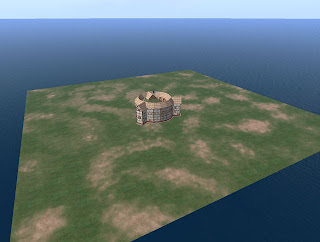
Our Globe Theatre was created by a developer in our department, and so we were able to export it to OpenSim fairly easily (see image above). The costumes are an entirely different matter, as they were produced by Karen Royer. Even large parts of the mannequins are purchased pieces.

This is a major issue in the educational use of OpenSim, which several people have highlighted. Generally speaking most academics don't have the time or ability to create good quality virtual environments. Even if they could, constantly rebuilding things that others have already made is wasted effort. Thankfully some resources are appearing, such as myOpenSim, although I'd prefer if they did away with the concept of pretend money.

Friday, 19 November 2010

Trying Diva - Part 2: wifi

Just a quick update to post some thoughts on the web interface supplied with Diva. The bottom line is that it's sole purpose at the moment is to administer accounts, and it does that well. It looks quite nice too.


I can definitely see the benefits of allowing people to register their own accounts, even in a stand-alone, classroom setting. However, there is potential to do a lot more. True, it also allows you to view your inventory, create folders and shuffle things around, but that's not particularly useful.

An alternative is the Opensim Webinterface - opensimwi (redux), as described here. It seems to have more features, including a more easily customisable front-end, but it looks a little dated. Out of the two I would probably still go with the Diva version.

A promising integration that was trialled a while back was linking Elgg to OSgrid. It was supposed to synchronise friends and groups between the two, and I'm sure it did when I registered some time ago, but it seems to have lost all of the functionality now. That's a shame.

I also remember hearing something about being able to buy things from other people's inventories. I'd like to see something like XStreetSL linked into the OpenSim database so that you can just list something as for sale in your inventory, and it would appear for sale in a web listing.

Wednesday, 10 November 2010

Trying Diva

I finally got around to trying the diva distribution of OpenSim. I followed the instructions available here, which actually weren't as complicated as it seemed at first glance. So long as you follow it step by step then it's pretty fool-proof. Although I've had previous experience with both OpenSim and an equivalent of MoWeS called XAMP, so I'd be interested to hear about other people's experiences.

One step that did look as though it could be a lot simpler was the setup of the MySQL server. My recommendation would be that at the point when you're choosing Apache2, MySQL5 etc in the MoWeS mixer (pretty much the first step in the instructions), that you also select PHPMyAdmin in the Application software section.

In step 1, after you get confirmation that Apache and MySQL is running, open a web browser and go to: http://localhost/phpmyadmin/

In the window that opens click on the Privileges tab (shown as 1 in the image).


Enter a User name of opensim, set a password (including retyping it), as shown in 2. Then select the radio button option to create a database with the same name, as shown in 3. That's it. No use of command prompts or typing in unfamiliar strings of text.


I've only had a brief play so far, but I'm looking forward to trying out the web interface and sending things flying around the Megaregion. My only concern was that I couldn't connect to it from another PC. Whether this is due to permissions or the hard-coded local IP I don't know. Hopefully the former.

Thursday, 14 October 2010

Running a LAN grid


I don't want to clutter this post with the background reasoning, but I would argue that the majority of educational uses of virtual worlds can be addressed by running 1 student per grid, or ad-hoc multi-user set-ups. The second of those seems to be a lot easier now than the last time that I tried it.

The instructions in this post will allow you to set-up a loca
l OpenSim grid, for use within an institution's firewall. You can walk into a lab, start the server on one PC, and have the students connect to it through other PCs.

Server setup:
  1. Download OpenSim and run it once in order to configure it - as described here.
  2. You will need to use the 'create user' command to create an account for each student.
  3. Copy the 'bin' folder to a USB stick.
Running the server:
  1. Plug in the USB stick
  2. Run OpenSim.exe (OpenSim.32BitLaunch.exe on 64bit machines).
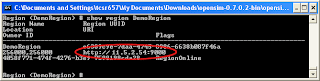
  3. **Update** In the OpenSim window, type: 'show region regionName'.
  4. Note down the text that starts with http://
If you've forgotten the name that you gave to your region, then it is shown in brackets within the OpenSim window, i.e. Region (regionName) #


Viewer setup:
  1. If you already have Second Life viewers installed then skip to the next bit
  2. Alternatively you can install a viewer on any PC, and then copy the viewer's folder from the 'Program Files' directory (typically on the C drive) onto a USB stick. The just run the executable in this folder.
You (or the students) will need to configure the viewers so that they connect to your server. If the server is run from the same PC each time, then you should only need to do this once.

Running the viewer (easy way):
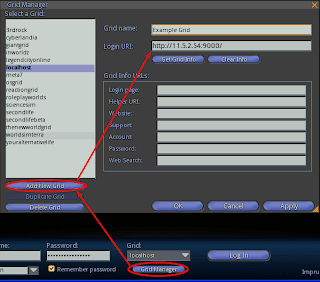
  1. Viewers such as Imprudence and Hippo include a grid manager where the ip address of the server can be added. Be sure to include 'http://' at the front and ':9000' at the end.

Running the viewer (slightly harder):
  1. Copy your existing shortcut to the viewer (assuming it's installed - if running from a USB right-click on the exe and choose 'create shortcut').
  2. Right-click on the new shortcut and choose 'Properties'.
  3. On the 'Shortcut' tab, look for the 'Target' option.
  4. At the end of the text in the 'Target' box add: '-loginuri http://11.5.2.54:9000/' where 11.5.2.54 is the ip address of the server.

There is of course a huge variety in networks and institutional setups, but hopefully these steps should work in most cases. You should consider involving your IT or eLearning department when trying to setup OpenSim in this way. They probably won't like running things from USB sticks, but their alternative might be a more robust system.