Tuesday, 23 November 2010

First OpenSim project?

Although I've experimented with OpenSim, and created a few generic educational tools, we haven't used it in a project at the University yet. Although we might do in the very near future.


Shown above are characters on the stage of our virtual Globe Theatre. A previous activity involved students positioning the mannequins (foreground) to explore issues of actor positioning and movement during a scene. To give a better understanding of the affordances of Second Life, it was decided to replace the mannequins with student controlled avatars (centre). This probably seems like an obvious decision to users of Second Life, but the students in question are being introduced to and using Second Life in a single session, and we wanted to reduce distractions from the core activity (navigation issues, creating logins etc). As a compromise we'll be providing pre-made accounts where avatars start in the right locations.

However, a challenge is that the class will need to be divided into groups for the activity and there is only one theatre. There isn't space on the island to duplicate it, and so hopefully OpenSim can come to the rescue.
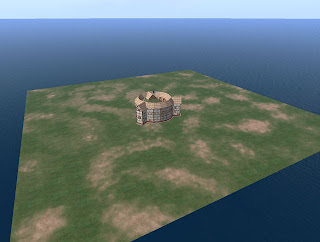

Our Globe Theatre was created by a developer in our department, and so we were able to export it to OpenSim fairly easily (see image above). The costumes are an entirely different matter, as they were produced by Karen Royer. Even large parts of the mannequins are purchased pieces.

This is a major issue in the educational use of OpenSim, which several people have highlighted. Generally speaking most academics don't have the time or ability to create good quality virtual environments. Even if they could, constantly rebuilding things that others have already made is wasted effort. Thankfully some resources are appearing, such as myOpenSim, although I'd prefer if they did away with the concept of pretend money.

Friday, 19 November 2010

Trying Diva - Part 2: wifi

Just a quick update to post some thoughts on the web interface supplied with Diva. The bottom line is that it's sole purpose at the moment is to administer accounts, and it does that well. It looks quite nice too.


I can definitely see the benefits of allowing people to register their own accounts, even in a stand-alone, classroom setting. However, there is potential to do a lot more. True, it also allows you to view your inventory, create folders and shuffle things around, but that's not particularly useful.

An alternative is the Opensim Webinterface - opensimwi (redux), as described here. It seems to have more features, including a more easily customisable front-end, but it looks a little dated. Out of the two I would probably still go with the Diva version.

A promising integration that was trialled a while back was linking Elgg to OSgrid. It was supposed to synchronise friends and groups between the two, and I'm sure it did when I registered some time ago, but it seems to have lost all of the functionality now. That's a shame.

I also remember hearing something about being able to buy things from other people's inventories. I'd like to see something like XStreetSL linked into the OpenSim database so that you can just list something as for sale in your inventory, and it would appear for sale in a web listing.

Wednesday, 10 November 2010

Trying Diva

I finally got around to trying the diva distribution of OpenSim. I followed the instructions available here, which actually weren't as complicated as it seemed at first glance. So long as you follow it step by step then it's pretty fool-proof. Although I've had previous experience with both OpenSim and an equivalent of MoWeS called XAMP, so I'd be interested to hear about other people's experiences.

One step that did look as though it could be a lot simpler was the setup of the MySQL server. My recommendation would be that at the point when you're choosing Apache2, MySQL5 etc in the MoWeS mixer (pretty much the first step in the instructions), that you also select PHPMyAdmin in the Application software section.

In step 1, after you get confirmation that Apache and MySQL is running, open a web browser and go to: http://localhost/phpmyadmin/

In the window that opens click on the Privileges tab (shown as 1 in the image).


Enter a User name of opensim, set a password (including retyping it), as shown in 2. Then select the radio button option to create a database with the same name, as shown in 3. That's it. No use of command prompts or typing in unfamiliar strings of text.


I've only had a brief play so far, but I'm looking forward to trying out the web interface and sending things flying around the Megaregion. My only concern was that I couldn't connect to it from another PC. Whether this is due to permissions or the hard-coded local IP I don't know. Hopefully the former.

Thursday, 14 October 2010

Running a LAN grid


I don't want to clutter this post with the background reasoning, but I would argue that the majority of educational uses of virtual worlds can be addressed by running 1 student per grid, or ad-hoc multi-user set-ups. The second of those seems to be a lot easier now than the last time that I tried it.

The instructions in this post will allow you to set-up a loca
l OpenSim grid, for use within an institution's firewall. You can walk into a lab, start the server on one PC, and have the students connect to it through other PCs.

Server setup:
  1. Download OpenSim and run it once in order to configure it - as described here.
  2. You will need to use the 'create user' command to create an account for each student.
  3. Copy the 'bin' folder to a USB stick.
Running the server:
  1. Plug in the USB stick
  2. Run OpenSim.exe (OpenSim.32BitLaunch.exe on 64bit machines).
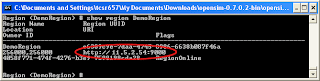
  3. **Update** In the OpenSim window, type: 'show region regionName'.
  4. Note down the text that starts with http://
If you've forgotten the name that you gave to your region, then it is shown in brackets within the OpenSim window, i.e. Region (regionName) #


Viewer setup:
  1. If you already have Second Life viewers installed then skip to the next bit
  2. Alternatively you can install a viewer on any PC, and then copy the viewer's folder from the 'Program Files' directory (typically on the C drive) onto a USB stick. The just run the executable in this folder.
You (or the students) will need to configure the viewers so that they connect to your server. If the server is run from the same PC each time, then you should only need to do this once.

Running the viewer (easy way):
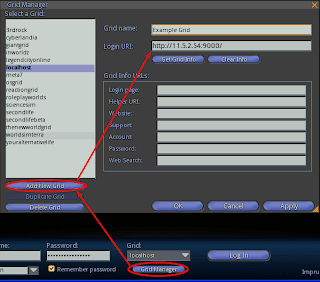
  1. Viewers such as Imprudence and Hippo include a grid manager where the ip address of the server can be added. Be sure to include 'http://' at the front and ':9000' at the end.

Running the viewer (slightly harder):
  1. Copy your existing shortcut to the viewer (assuming it's installed - if running from a USB right-click on the exe and choose 'create shortcut').
  2. Right-click on the new shortcut and choose 'Properties'.
  3. On the 'Shortcut' tab, look for the 'Target' option.
  4. At the end of the text in the 'Target' box add: '-loginuri http://11.5.2.54:9000/' where 11.5.2.54 is the ip address of the server.

There is of course a huge variety in networks and institutional setups, but hopefully these steps should work in most cases. You should consider involving your IT or eLearning department when trying to setup OpenSim in this way. They probably won't like running things from USB sticks, but their alternative might be a more robust system.

Wednesday, 13 October 2010

OpenSim commands


You can type commands into the OpenSim window. It can be a bit daunting if you are not used to 'command line' applications, and although there is a possibility that you might completely wipe everything that you've made, the chances of doing it by accident are very slim (hint: avoid any commands that include the word 'delete').

To list the available commands type: help
To create a flat terrain (taken from Roger Stack) type: terrain fill 21
If you're tired of being Test User type: create user firstname lastname
When you're finished and want to shut down type: quit

Note that permissions are ignored by default, so even if you login as a different avatar you will still be able to modify everything that's there. You won't have access to the other avatar's inventory though - unless you feel brave and use the IAR system to transfer it.

Running OpenSim from USB


With Linden Labs pushing out educators there have been an increasing number of blog posts regarding OpenSim. What caught my attention were the guides to running OpenSim from a USB stick, such as the one by Roger Stack. Although very comprehensive and probably the best way of doing things, it's quite complicated, and we should be showing educators how easy it can be.

And so, the easy way:
  1. Go to http://opensimulator.org/wiki/Download
  2. Download the zip file under the 'Binary Packages' heading, and extract it somewhere
  3. In the Bin folder, run OpenSim.exe (OpenSim.32BitLaunch.exe on 64 bit machines)
  4. Eventually you'll be asked for a region name - enter something
  5. For everything else just keep pressing Enter to accept the default settings
  6. Wait until it says: Region (the name you entered) #
That's it. You now have a locally running OpenSim server. Copy the bin folder to any location where you want to run the server from (including a USB stick). Always remember to close the server correctly by typing quit.


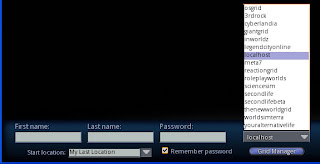
Connecting to the server is also easier than some have described. Don't bother messing around with shortcuts; viewers such as Imprudence and Kirstens allow you to pick 'localhost' from a drop-down list:


Assuming you went along with the default values you can login with first name: Test, last name: User, and leave the password field blank.


Monday, 22 February 2010

Linden Lab's war on games continues

Linden Labs recently over-hauled their forums. I'll ignore the fact that it's broken for now, since they're sure to fix it at some point.

However, the first thing that I noticed was the fact that the games section of the forum has been removed. It's true that it didn't get too much activity, and that might have been their selection criteria when moving between systems, but it certainly doesn't help the gaming community.